
When you think about switching to a SaaS model, the question is often asked: Can I run 4D on the cloud? Yes, you can — if you have the right architecture and tooling and cloud deployment strategy. This article covers 4D cloud deployment, 4D on Azure, deploying 4D to AWS or Azure, setting up 4D in the cloud, strategies, hosting 4D server and modern infrastructure patterns (virtual machine, Docker, SSL setup, load balancing). We will also explain how you can benefit from Wizmo through its 4D cloud deployment service. Besides, you can hire a 4D cloud expert to help you.

Table of Contents
Why Move Your 4D Application to the Cloud?
Before getting into the technical practices, let’s have a quick look at the benefits.
- Cloud infrastructure allows for dynamic scaling as demand changes.
- With distributed deployments, users can access your 4D app from anywhere, thus reducing latency.
- Cost model changes from CapEx (on-premise hardware) to OpEx (pay for what you use).
- Business agility: Speedy rollouts, seamless updates, quick disaster recovery.
- Cloud deployment is necessary to offer a subscription service on Software as a Service.
Consequently, 4D cloud deployment is a natural evolution for ISVs looking to upgrade their client-server 4D apps into a cloud-native SaaS offering. Vendors can obtain help from Wizmo to take that lead easily, Architectural Decisions for 4D Cloud Deployment.
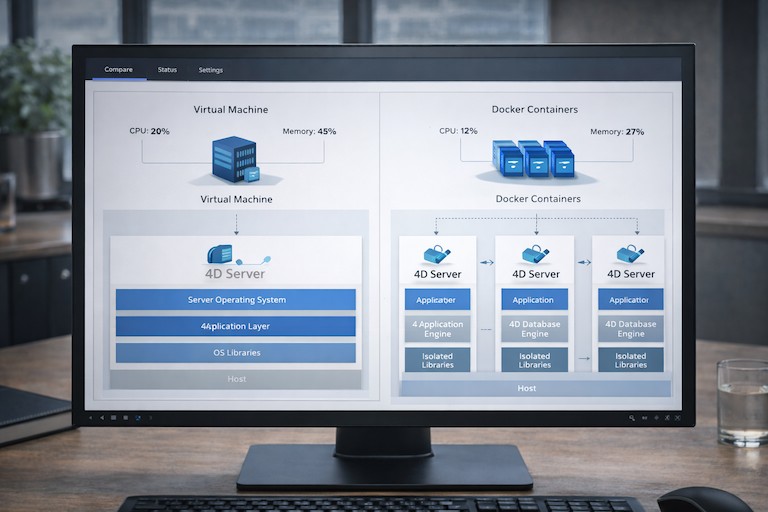
1. Virtual Machine vs Docker Container
The first decision you have to make is whether to run 4D on Azure (or AWS) with VMs or whether to Dockerize the 4D server stack.
- Using a virtual machine (VM) can make 4D server environments easier to lift and shift due to the isolation and familiarity of this implementation. You can use the 4D Server on a VM, maintaining your configuration for the database, files and network.
- Containers make a project portable and can allow for faster deployments, plus easier scaling. The Dockerization of 4D may involve some extra adaptations, for example, you would normally want storage mounts and/or persistent volumes and usually, some form of networking. Many early adopters use VM deployment first, later containerizing parts of the stack.
The aim is to provide and maintain your 4D server runtime in a stable, performant and scalable fashion in the cloud, either using a virtual machine or Docker.
2. Deciding between AWS and Azure cloud platforms
Questions like ‘How do I set up 4D on AWS?’ or ‘Can 4D be deployed on AWS or Azure?’ come up frequently when organizations begin evaluating cloud infrastructure.
Azure allows easy access to Windows-based instances, as well as hybrid cloud connections (e., ExpressRoute, VNet). If you’re an ISV that already uses the Microsoft stack, Azure may feel more natural.
AWS provides flexibility, a wide choice of services, and a mature infrastructure for operations such as deployment across regions. A lot of 4D users deploy either on AWS EC2 instances or utilize AMIs.
No matter what platform you use (Linux, Windows, etc.), the principles are the same: install a 4D server tier that connects to backend storage/databases; set up networking and security; handle scaling via load balancing.
3. Hosting the 4D Server Layer
To host a 4D server in the cloud, follow these guidelines:
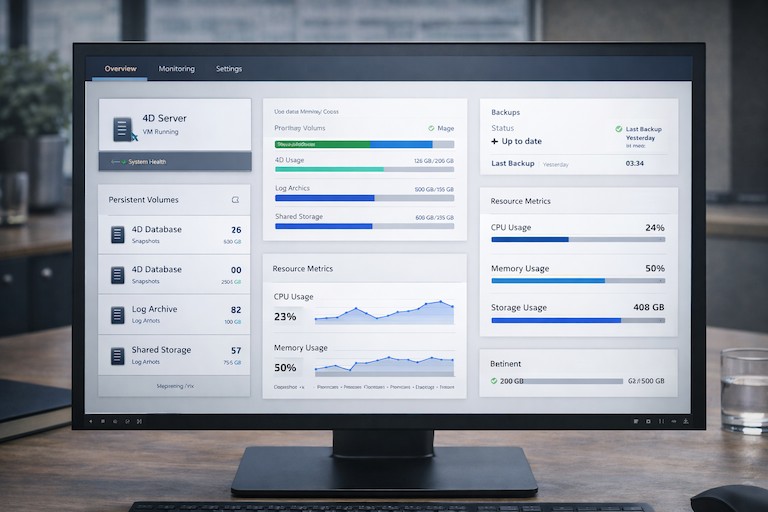
- Use dedicated instances or containers for your 4D Server to avoid resource contention.
- Use persistent volumes or NAS for your 4D database files.
- Enable automatic backups and snapshots for data durability.
- Continuously monitor resource metrics (CPU, memory, I/O) and set the autoscaling thresholds correctly.
You can evolve the architecture as demand grows by isolating the database and application tiers.
4. SSL Setup & Security Best Practices
Security is non-negotiable. As part of your 4D cloud deployment.
- Encrypt the data traffic between clients and the 4D server endpoint using Channel Secured.
- Make use of automated certificate management like Let’s Encrypt or Azure Key Vault.
- Make the firewall rules stricter and limit the ports open to incoming communication to only the necessary ones. For example, the 4D standard port, HTTPS, etc.
- Use VPN or private networks for backend services where possible.
- Allow access according to user roles, establish separate domains, and detect breaches.
If you perform an SL setup, it guarantees confidentiality. Further, it also protects data flows’ integrity in your 4D APP.
5. Load Balancing & High Availability
Load balancing and high availability are necessary for any serious SaaS deployment.
- Use a load balancer natively in the cloud, Azure Load Balancer, AWS ELB, in front of multiple 4D server instances.
- Use health probes to detect and route around failing instances.
- Keep sessions sticky if your 4D app expects a session state on a particular instance, or use shared session storage.
- Use Backups and Replicas Within and Across Zones or Regions to Minimize Single Points of Failure.
Your 4D cloud can support more users, withstand failures, and perform well under load with proper load balancing.
6. Data Migration & Cutover Planning
Relocating a present 4D on-site structure to the cloud:
- Data extraction, integrity verification, and schema compatibility.
- Synchronizing changes until the cut-over moment.
- Plan a maintenance window or rolling migration to reduce downtime.
- Validation post-migration and fall-back plans.
Wizmo possesses deep experience guiding ISVs through the migration planning steps to reduce risk.
Best Practices for Successful 4D Cloud Deployment
Here are more best practices that result in smoother and more robust 4D cloud deployment:
- Test how well your app will perform before you roll it out. Check out your 4D workload in the cloud. This means checking it in a virtual machine and disk types, and network delays.
- Start with a test group before applying the strategy to the entire client base.
- Use infrastructure as code (IaC), i.e., scripts or templates for reproducible, version-controlled.
- Automate the deployment and updates with CI/CD pipelines to improve reliability.
- Keep a close watch on application logs, database metrics, network health, and error traces.
- Prepare for scaling in advance by outlining the rules and reasons that will initiate a scale.
- To reduce costs, use the right-sized instances, reserved capacity, or spot pricing wherever it is safe to do so.
As you go through these steps, you will be using via virtual machine, Docker, SSL setup, and load balancing patterns.
How Wizmo Can Help with Your 4D Cloud Deployment
Migrating and operating 4D in the cloud is a specialty. That’s where Wizmo’s 4D cloud deployment service comes in. Here’s how we help:
- Our team assists you in optimizing the cloud network configuration of your 4D application with VMs and containers.
- We handle everything from data migration to cutover with minimal downtime during migration planning and execution.
- Wizmo can manage your SaaS stack after deployment. Uptime, patches, monitoring, and scaling are all handled. wizmo com+1.
- The specialist will set up SSL, harit den with network settings, and ensure compliance with standards.
- We set up load balancing, session affinity, and multi-zone redundancy in the cloud to improve outputs.
- Ongoing Optimization: Continuous improvements on performance tuning, cost and infrastructure.
An expert 4D cloud solution specialist can be hired from my team who can work with you. Set up a free consultation with Wizmo to begin your cloud journey.
Building a Future-Ready 4D Cloud Deployment Strategy
Running 4D applications in the cloud is no longer experimental—it’s a practical step for organizations looking to scale, support distributed users, and move toward SaaS delivery. With the right architecture in place, 4D can run reliably on modern cloud infrastructure using virtual machines, containers, secure networking, and high-availability patterns.
Cloud deployment does introduce complexity, particularly around migration planning, security, and long-term operations. That’s where experienced guidance can help reduce risk and avoid costly missteps.
Wizmo works with teams to plan, deploy, and operate 4D environments in the cloud, whether on AWS, Azure, or hybrid infrastructure, covering everything from initial architecture decisions to migration, security configuration, and ongoing optimization.
If you’re considering a move to the cloud or evaluating your current 4D deployment, get in touch with Wizmo to discuss your environment and next steps.